그림으로 보는 ZENFLOW 사용 안내
ZENFLOW 음악 서비스(zenflow.company) · 2026년 11월
ZENFLOW는 오늘의 마음에 맞는 음악을 듣고 고른 뒤, 악기와 자연 소리를 더해 나만의 앨범으로 저장하는 곳입니다. 회원가입과 결제 없이 무료로 체험할 수 있습니다.
처음이라면 아래 네 단계만 기억하세요. 화면 오른쪽 아래의 🤖 도우미가 한 번에 하나씩 물어보며 대신 눌러 드립니다.
▶ 지금 시작하기
네 단계로 만드는 나만의 음악
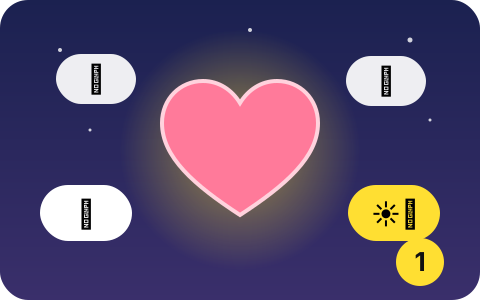
① 지금 마음 고르기
도우미에게 "지금 어떤 상황이세요?"라는 질문을 받으면, 가장 가까운 것을 하나 고르세요. 쉬고 싶은 날, 기분 좋은 하루, 추억을 담고 싶은 날처럼 생활의 장면으로 되어 있어 고르기 쉽습니다.
버튼에 없는 마음은 문장으로 적어도 됩니다. 예: "오늘 너무 지쳤어, 조용한 음악이 듣고 싶어".
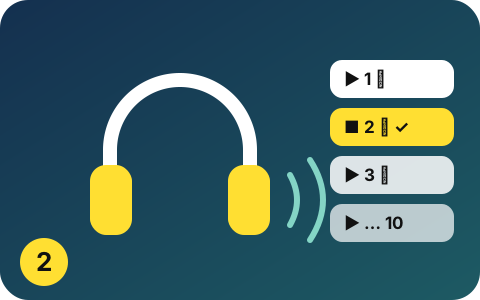
② 10곡 듣고 고르기
고른 마음에 맞춰 10곡이 바로 나옵니다. 앞쪽 곡은 지금 마음에 가깝고, 뒤로 갈수록 조금씩 밝아지도록 순서를 정했습니다.
▶ 버튼으로 미리 듣고, 마음에 들면 "이 곡 선택"을 누르세요. 다른 곡이 듣고 싶으면 "다른 10곡 듣기"를 누릅니다.
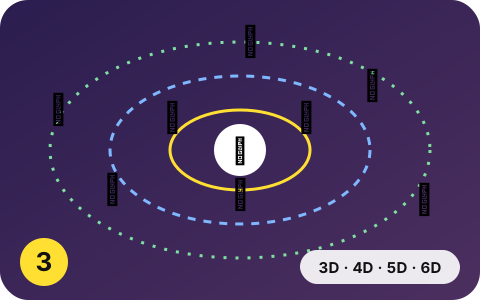
③ 소리 꾸미기 (선택)
고른 곡에 소리를 더할 수 있습니다. 건너뛰어도 괜찮습니다.
- 3D 악기: 국악기와 세계 악기 중 서로 다른 소리 세 가지를 골라 곡 위에 얹습니다.
- 4D 바탕음: 모든 소리 밑에 잔잔하게 깔리는 소리입니다.
- 5D 자연 소리: 빗소리, 물소리, 바람, 파도를 원하는 만큼 섞습니다.
- 6D 내 취향: 느낌과 빠르기 같은 취향을 더합니다. 질문에 답하기만 하면 됩니다.
각 단계에서 도우미가 그 곡에 어울리는 것을 ⭐로 추천합니다. "추천대로 끝까지 맡기기"를 누르면 한 번에 끝납니다.
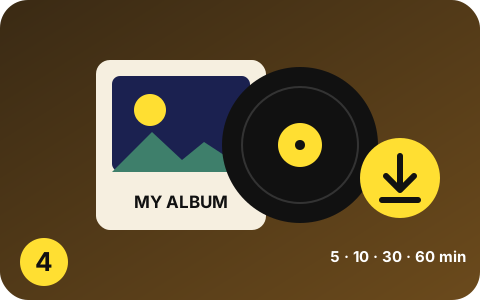
④ 앨범으로 저장
5분, 10분, 30분, 1시간처럼 원하는 길이를 고르면 곡을 자연스럽게 이어 긴 앨범으로 만듭니다. 시작과 끝은 소리가 서서히 커지고 작아집니다.
완성본을 들어 본 뒤 WAV 파일로 저장합니다. 사진을 넣은 영상 앨범(10분까지)도 만들 수 있습니다.
자주 묻는 질문
- 돈이 드나요? 회원가입이 필요한가요?
- 지금은 무료 체험이며 회원가입도 결제도 없습니다. 하루 이용 시간에는 한도가 있을 수 있습니다. 유료로 바뀔 때는 가격과 조건을 미리 알리고, 동의한 분에게만 청구합니다.
- 내가 넣은 사진과 음악 파일은 어디로 가나요?
- 내 기기의 브라우저 안에서만 처리하고 서버로 보내지 않습니다. 자세한 내용은 개인정보처리방침에 있습니다.
- 휴대폰에서도 되나요?
- 네. 휴대폰, 태블릿, PC에서 모두 쓸 수 있습니다. 입체감은 이어폰으로 들을 때 가장 잘 느껴집니다.
- 만든 음악을 유튜브 수익 영상이나 판매에 써도 되나요?
- 개인 감상과 수익이 나지 않는 개인 SNS 공유에 쓸 수 있습니다. 판매, 광고, 방송, 음원 유통, 수익 창출 영상 같은 상업적 이용은 따로 서면으로 허락받은 경우에만 가능합니다. 이용약관을 참고하세요.
- 악기 소리는 어디서 왔나요?
- 국립국악원 국악기 음원(공공누리 제1유형), 공개 라이선스(CC0) 세계 악기 음원, ZenFlow가 연주자에게 의뢰해 매입한 녹음입니다. 곡과 악기마다 출처와 라이선스를 기록해 둡니다.
- 마음이 치료되나요?
- ZENFLOW는 편안한 음악을 고르고 만드는 서비스이며, 의료 서비스가 아닙니다. 성격이나 건강 상태를 진단하지 않고, 치유 효과를 약속하지 않습니다.
마음이 많이 힘들 때
혼자 견디지 않으셔도 됩니다. 자살예방 상담전화 109(24시간, 무료)에서 이야기를 들어 드립니다. 지금 위험하다면 119에 연락하세요. 도우미에 힘든 마음을 적으면 상담 연락처를 먼저 보여 드립니다.
문의
운영자: ZENAMI(개인 운영) · 이메일: contact@zenflow.company
ZENFLOW guide, in pictures
ZENFLOW music service (zenflow.company) · November 2026
ZENFLOW is where you listen to music that fits how you feel today, choose a song, add instruments and nature sounds, and save it as your own album. It is free to try, with no sign-up and no payment.
If you are new, remember just four steps. The 🤖 helper at the bottom right asks you one thing at a time and presses the buttons for you.
▶ Start now
Your music in four steps
① Choose how you feel
When the helper asks what is going on for you, pick the closest answer: a day to rest, a good day, a memory to keep. They are everyday scenes, so choosing is easy.
Not listed? Type a sentence instead, such as "I am so tired today, I want quiet music".
② Listen and pick from ten
Ten songs for that feeling appear at once. The first stay close to how you feel; later ones slowly lift.
Press ▶ to listen and "Choose" when you like one. Want others? Press "Ten other songs".
③ Add sounds (optional)
You can add sounds to your song, or skip this step.
- 3D instruments: three different sounds from Korean and world instruments, laid over the song.
- 4D undertone: a quiet layer beneath everything.
- 5D nature: rain, a stream, wind or waves, as much as you like.
- 6D taste: your feel and pace. Just answer the questions.
At each step the helper marks the best fit with ⭐. "Do the rest as suggested" finishes everything in one press.
④ Save as an album
Choose a length such as 5, 10 or 30 minutes or an hour, and the song is joined smoothly into a long album that fades in and out.
Listen to the result, then save it as a WAV file. A photo video album (up to 10 minutes) is also available.
Questions
- Does it cost anything? Do I need an account?
- It is a free trial with no account and no payment. A daily listening limit may apply. Before anything becomes paid, we announce the price and terms and charge only those who agree.
- Where do my photos and music files go?
- They are processed only in your browser on your device and are not sent to our server. See the privacy policy.
- Does it work on a phone?
- Yes, on phones, tablets and computers. The sense of space is best with earphones.
- Can I use my music in monetised videos or sell it?
- You may use it for personal listening and non-monetised personal social media. Commercial use needs our separate written permission. See the terms of use.
- Where do the instrument sounds come from?
- National Gugak Center recordings (KOGL Type 1), openly licensed (CC0) world-instrument libraries, and recordings ZenFlow commissioned and bought from players. Sources and licences are recorded for every song and instrument.
- Will it heal me?
- ZENFLOW helps you choose and make calming music. It is not a medical service, does not diagnose personality or health, and promises no healing effect.
If you are going through a hard time
You do not have to carry it alone. Find a free helpline in your country at findahelpline.com, or call your local emergency number if you are in danger. If you write a hard feeling to the helper, it shows where to reach people first.
Contact
Operator: ZENAMI (individually operated) · E-mail: contact@zenflow.company